FPV cameras are everywhere in the world of drones, racing quads, and remote-controlled vehicles. If you’ve ever watched a drone race or seen a pilot wearing video goggles, you’ve probably wondered: do FPV cameras record video? This question is more important than it seems. Understanding the answer can help you choose the right gear, avoid mistakes, and capture amazing footage. In this guide, we’ll explore how FPV cameras work, whether they record video, alternatives for recording, and practical advice for beginners and experts. Let’s dive into the world of FPV cameras and clear up the confusion.
What Is An Fpv Camera?
FPV stands for First Person View. An FPV camera is a small camera mounted on drones, RC planes, or other vehicles. This camera sends live video to a monitor or goggles, allowing the pilot to see what the vehicle sees. FPV cameras are essential for drone racing, freestyle flying, and many remote-controlled activities. They provide real-time feedback, making the pilot feel as if they are inside the vehicle.
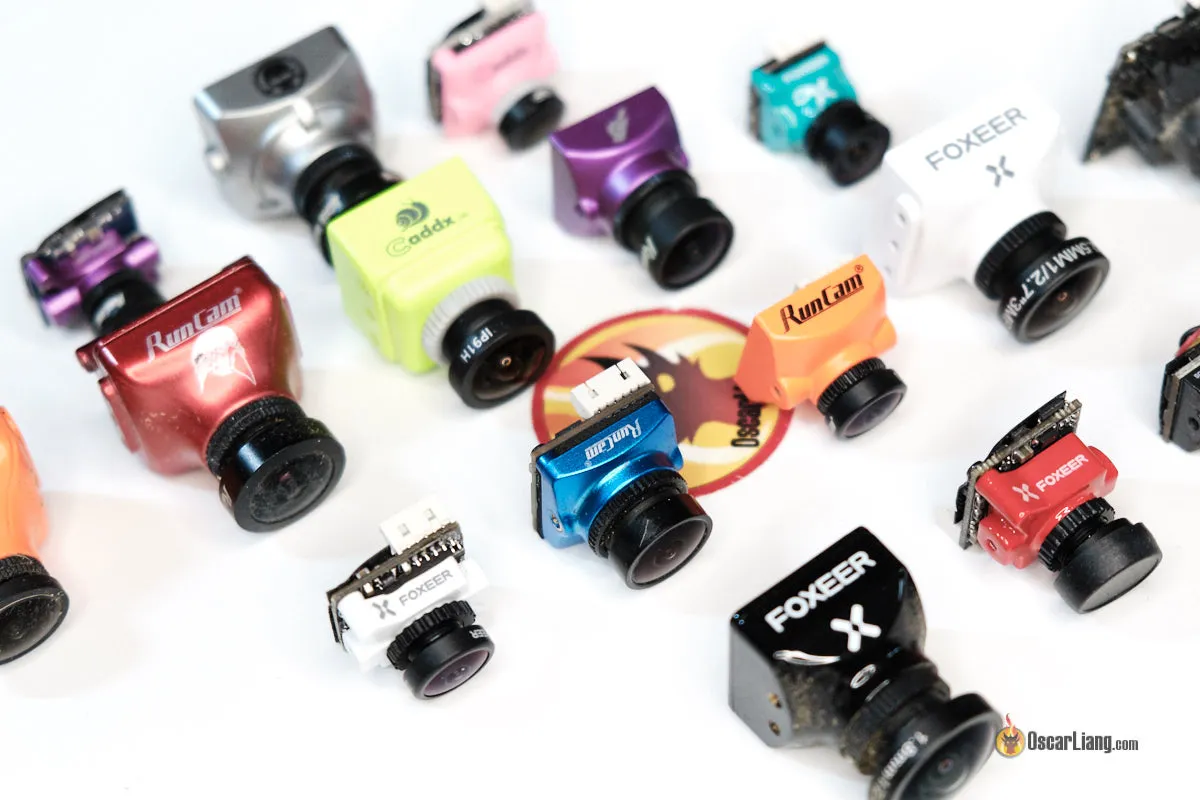
FPV cameras come in different shapes and sizes. Most are lightweight and designed for fast video transmission. They use analog or digital signals to send video to the pilot, usually over radio frequencies. These cameras are built for speed, reliability, and low latency — meaning the video arrives quickly, with little delay.
Do Fpv Cameras Record Video?
This is the main question. Most FPV cameras do NOT record video. Their purpose is to send live video to the pilot, not to save footage. The majority of FPV cameras are “video transmitters,” not “video recorders.”
Why Don’t Fpv Cameras Record Video?
FPV cameras focus on real-time transmission. They need to be light, fast, and simple. Adding a recording feature would increase weight, complexity, and cost. Many FPV pilots don’t need to record — they just want to fly using live video.
There are other reasons, too:
- Power limitations: FPV cameras are often powered by small batteries. Recording video requires more energy.
- Heat issues: Recording creates heat. Small FPV cameras can overheat if they try to record and transmit at the same time.
- Space constraints: Most FPV drones have limited room. Adding recording parts can make the drone heavier and harder to control.
What Happens If You Want To Record?
If you want to save your FPV flight, you need another device. This is where action cameras and DVRs (Digital Video Recorders) come in. Many FPV setups include a second camera or a recording module.
Types Of Fpv Cameras
FPV cameras are not all the same. Let’s look at the main types, and how they handle recording.
Analog Fpv Cameras
Analog FPV cameras are the most common. They use radio frequencies to send video. Popular models include the RunCam Swift, Foxeer Predator, and Caddx Turbo.
- Recording: Analog FPV cameras do not record video themselves.
- Transmission: They send video to a receiver, which shows the image on goggles or a screen.
Digital Fpv Cameras
Digital FPV cameras are newer and use advanced technology. Examples include the DJI FPV system and Walksnail Avatar.
- Recording: Some digital FPV systems allow recording, but not always directly from the camera.
- Transmission: Digital systems transmit high-quality video, often with less interference.
Fpv Cameras With Built-in Dvr
A few FPV cameras have built-in DVRs. These are rare and usually more expensive. For example, the RunCam Split series can record video on a microSD card while also transmitting FPV feed.
- Recording: These cameras can record and transmit at the same time.
- Drawbacks: Built-in DVRs add weight and can affect flight performance.
| FPV Camera Type | Records Video? | Transmission Quality | Typical Use |
|---|---|---|---|
| Analog FPV | No | Medium | Racing, Freestyle |
| Digital FPV | Rarely | High | Cinematic, HD FPV |
| FPV with DVR | Yes | High | Recording & Live Flight |
How Fpv Video Transmission Works
FPV video transmission is about speed and clarity. The camera captures video, sends it to a transmitter, and the transmitter sends it to the pilot’s goggles or screen. Here’s how it works:
- Camera captures video.
- Video goes to transmitter.
- Transmitter sends video signal over radio frequencies.
- Receiver picks up signal.
- Video appears on goggles or monitor.
This process happens in real-time, with delays as low as 10 milliseconds. That’s fast enough for racing drones moving at over 80 mph.
Does The Signal Get Recorded?
Not usually. The video signal is meant for live viewing. If you want to record, you have two main options:
- Onboard recording: Add a separate camera (like a GoPro) to record high-quality footage.
- DVR on goggles/receiver: Some FPV goggles and receivers have a built-in DVR. They can record the video signal received from the FPV camera.

Recording Fpv Footage: Common Methods
FPV pilots often want to record their flights for fun, learning, or sharing. Since most FPV cameras don’t record, here are the common ways people capture footage.
1. Using An Action Camera
Mounting an action camera (like a GoPro, Insta360, or DJI Osmo) on your drone is the most popular method. These cameras record high-quality video and can be removed after the flight.
- Advantages: Great image quality, easy editing, no impact on FPV transmission.
- Disadvantages: Extra weight, higher cost, possible balance issues.
2. Dvr In Fpv Goggles
Many FPV goggles have a DVR feature. This lets you record the video you see in your goggles. This footage is lower quality (analog), but it’s useful for reviewing flights or finding lost drones.
- Advantages: Simple, records exactly what the pilot sees, no extra camera needed.
- Disadvantages: Lower quality, can have static or interference.
3. Fpv Camera With Built-in Dvr
Some FPV cameras have a built-in DVR. The RunCam Split and Caddx Tarsier are examples. These record footage directly on a microSD card.
- Advantages: No extra camera needed, good quality.
- Disadvantages: Slightly more expensive, adds weight, not as high quality as action cameras.
4. Recording Via Ground Station
Some pilots use a ground station to record the FPV feed. This is a receiver connected to a screen and a DVR.
- Advantages: Useful for long-range flights, multiple pilots can view and record.
- Disadvantages: Lower quality, requires more equipment.
5. Using Digital Fpv Systems
Digital FPV systems (like DJI FPV) may allow recording on the goggles, the drone, or both. They offer higher quality footage and smoother video.
- Advantages: High quality, easy integration.
- Disadvantages: Higher cost, more complex setup.
| Recording Method | Video Quality | Added Weight | Cost |
|---|---|---|---|
| Action Camera | High | High | High |
| DVR in Goggles | Low | None | Low |
| Built-in DVR FPV | Medium | Medium | Medium |
| Ground Station | Low | None | Medium |
| Digital FPV | High | Low | High |
Pros And Cons Of Recording Fpv Video
Pros
- Share flights: Recording lets you show others your flights.
- Review performance: Watch your footage to improve skills.
- Find lost drones: Video can help locate drones after crashes.
- Create content: Many FPV pilots upload videos to YouTube and social media.
Cons
- Added weight: Cameras and DVRs add mass, affecting flight.
- Lower flight time: Heavier drones use more battery.
- Complex setup: More gear means more things to manage.
- Possible interference: Some recording devices can cause signal problems.
Fpv Camera Recording Vs Action Cameras
FPV cameras and action cameras serve different purposes. Let’s compare them:
| Feature | FPV Camera | Action Camera |
|---|---|---|
| Live Transmission | Yes | No |
| Recording | Rarely | Yes |
| Image Quality | Medium | High |
| Weight | Low | High |
| Latency | Low | High |
| Price | Low | High |
FPV cameras are for real-time control. Action cameras are for recording high-quality video. Some pilots use both — an FPV camera for flying, and an action camera for recording.
What Beginners Often Miss
Many new FPV pilots assume their FPV camera records video. This is a common mistake. They buy a drone, fly it, and later realize they have no footage. It’s important to know that:
- FPV cameras are for live viewing.
- Recording needs separate gear.
Another point many miss: DVR in goggles records only what you see — including static, interference, and image drops. If you want clean, HD footage, use an action camera or a built-in DVR FPV camera.
Choosing The Right Recording Setup
Picking the right recording setup depends on your goals, budget, and drone type.
For Racing Drones
- Use lightweight gear.
- Rely on DVR in goggles for flight review.
- Avoid heavy action cameras.
For Freestyle And Cinematic Drones
- Use action cameras for high-quality footage.
- Consider FPV cameras with built-in DVR if weight is a concern.
For Beginners
- Start with DVR in goggles or receiver.
- Upgrade to action camera as skills improve.
For Long-range Fpv
- Use ground station for recording, plus action camera for best quality.
Technical Details: Resolution, Frame Rate, And Latency
FPV camera specs are different from recording cameras. Here are key points:
- Resolution: FPV cameras usually have lower resolution (600-1200 TVL for analog, 720p/1080p for digital).
- Frame Rate: High frame rates (60fps or more) are important for smooth video.
- Latency: Low latency (less than 20ms) is critical for control. Recording cameras can have higher latency.
If you want to record HD video, action cameras offer 4K at 60fps or more. Built-in DVR FPV cameras can record up to 1080p, but usually at lower quality.
Practical Tips For Fpv Video Recording
- Check compatibility: Make sure your FPV goggles or receiver support DVR if you want to record.
- Balance weight: Heavy cameras affect flight. Try lighter action cameras or built-in DVR FPV cameras for small drones.
- Secure your camera: Use strong mounts. Loose cameras can fall off during crashes.
- Test before flight: Make sure your recording device is working and has enough battery/memory.
- Review footage: Use recordings to find mistakes and improve your flying.
Real-life Examples
- Drone Racing: Pilots use analog FPV cameras for live control. They record flights with DVR in their goggles, mainly to review crashes and improve skills.
- Freestyle Flying: Pilots mount GoPro cameras to record HD footage for YouTube and Instagram. FPV cameras are used for flying, action cameras for recording.
- Cinematic FPV: Using digital FPV systems, pilots record high-quality video on the drone or goggles. They edit footage for commercial projects and film production.
Common Mistakes And How To Avoid Them
- Assuming FPV cameras record: Always check specs. If you want recording, look for built-in DVR models.
- Ignoring weight: Heavy cameras make drones harder to control. Pick the right camera for your drone size.
- Not testing gear: Many flights are lost because the camera wasn’t recording. Always test before takeoff.
- Using poor mounts: Secure cameras tightly. Loose mounts cause shaky footage and risk losing the camera.
Legal And Safety Considerations
Recording FPV flights can raise privacy and legal issues. Always follow local laws:
- Respect privacy: Don’t record people without permission.
- Follow drone laws: Some places have rules about recording and flying drones.
- Register your drone: In the US, drones over 0.55 lbs must be registered.
You can check official rules and guidelines at the FAA website: FAA Drone Rules.

Frequently Asked Questions
Can My Fpv Camera Record Video Directly?
No, most FPV cameras only transmit live video. If you want to record, you need a separate device like an action camera, built-in DVR FPV camera, or DVR in your goggles.
What Is The Best Way To Record Fpv Flights?
For high-quality footage, use an action camera (like GoPro) mounted on your drone. For reviewing flights, use DVR in your FPV goggles or a built-in DVR FPV camera.
Do Fpv Goggles Record Video?
Some FPV goggles have a built-in DVR. They record the video feed received from the FPV camera. The quality is lower than action cameras but useful for reviewing flights.
Are There Fpv Cameras That Record And Transmit Video?
Yes, a few models like the RunCam Split or Caddx Tarsier can record video on a microSD card while transmitting FPV feed. These are useful for pilots who want both functions in one device.
Does Recording Video Affect My Drone’s Flight?
Recording devices add weight and use extra power. This can reduce flight time and affect handling. Choose lightweight options for racing drones, and secure cameras properly to avoid losing them.
FPV cameras are a vital part of drone flying, but they rarely record video themselves. To capture your flights, use action cameras, DVRs, or FPV cameras with built-in recording. Choosing the right setup depends on your needs and drone type.
Understanding these options will help you avoid mistakes, improve your skills, and create amazing footage.