
Your camera is likely struggling to focus because of a combination of environmental factors, hardware obstructions, or incorrect settings that prevent the autofocus system from locking onto your intended subject. When a lens hunts for focus or produces consistently blurry images, it’s rarely a sign of a permanent death for your camera, but rather a signal that the sensor and optics are failing to communicate effectively in your current shooting conditions.
Key Takeaways

- Clean your front lens element and rear element with a microfiber cloth to remove smudges or dust.
- Ensure your subject has enough contrast, as autofocus systems rely on detecting lines and edges to calculate distance.
- Check your lens switch to verify that you haven’t accidentally toggled it into manual focus mode.
- Update your camera firmware to the latest version to resolve known software-based autofocus bugs.
- Test your camera with a different lens to isolate whether the issue lies in the camera body or the glass.
Why Is My Camera Not Focusing?
The most frequent culprit for soft or missed focus is a lack of contrast in the scene. Modern autofocus systems, whether phase-detection or contrast-detection, require a clear boundary between light and dark areas to determine distance.
If you’re pointing your camera at a blank, featureless wall or a solid-colored sky, the autofocus motor will move back and forth endlessly, unable to find a point of reference. Low light conditions compound this issue, as the sensor struggles to distinguish detail from digital noise.
Physical Obstructions and Lens Cleanliness
Before adjusting complex settings, inspect the physical state of your gear. A fingerprint on the front element can act like a soft-focus filter, scattering light and confusing the autofocus sensor. Furthermore, check the mounting point where the lens meets the camera body. Electronic contact pins on the lens mount facilitate communication between the camera and the lens; if these are dirty or oxidized, the camera can’t send focus instructions to the motor.
| Component | Common Issue | Solution |
|---|---|---|
| Front Glass | Fingerprints or smudges | Gently wipe with a microfiber cloth |
| Lens Mount | Dirty electronic pins | Clean with a dry, lint-free swab |
| Lens Barrel | Stuck or jammed motor | Check for debris in the zoom ring |
| Sensor | Dust or debris | Use a professional cleaning kit |
Are Your Settings Holding You Back?
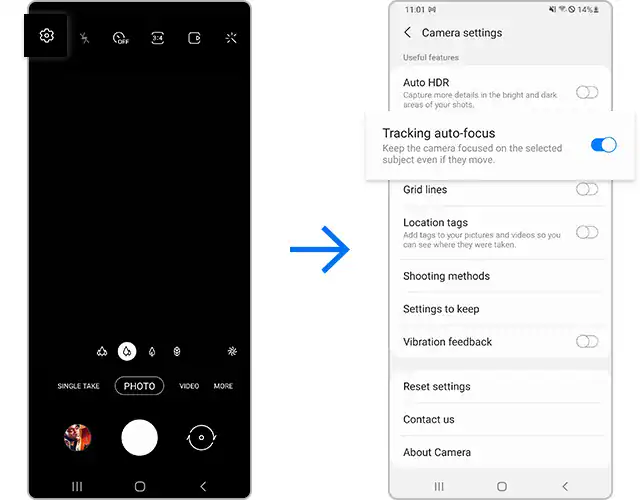
Sometimes, the camera is working perfectly, but your configuration is incompatible with the subject. If you’re using a narrow aperture in a dim room, the camera may struggle to get enough light to verify focus. Additionally, ensure your autofocus mode matches the movement of your subject. For stationary objects, use a single-point focus mode, but for moving subjects, switch to a continuous tracking mode.
Pro Tip: If your camera offers “Back Button Focus,” enable it to separate the shutter button from the focus trigger, which gives you more control over exactly when the camera locks onto a target.
How Firmware Affects Focus Accuracy
Manufacturers frequently release software updates to improve the speed and accuracy of the autofocus algorithm. If your camera is running an outdated version, it may not be optimized for newer lenses or specific shooting situations. You can find the latest software updates on the official manufacturer support page for your specific camera model. Installing these updates can often fix bugs where the camera consistently front-focuses or back-focuses on the subject.
Testing Your Lens for Calibration
If your camera focuses perfectly on a static target but consistently misses slightly in front of or behind the subject, you might be dealing with a calibration issue. Many high-end DSLR cameras feature “AF Micro-Adjustment” in the menu system. This allows you to calibrate the lens to the body so that the focus plane aligns perfectly with the sensor.
Steps to check for calibration errors:
- Place a focus chart or a ruler at a 45-degree angle on a flat surface.
- Set your camera on a tripod to ensure zero movement during the test.
- Focus on a specific line on the ruler using your widest aperture.
- Review the photo at 100% zoom to see if the sharpest point matches your target line.
Environmental Factors Affecting Focus
Even the most expensive equipment can fail if the environment is hostile to autofocus. Heat haze, often seen rising from hot asphalt or desert sand, refracts light in unpredictable ways, causing the autofocus system to drift. Similarly, shooting through glass, such as a window or an aquarium, creates a secondary surface that can trick the camera into focusing on the reflection rather than the subject on the other side.
- Avoid shooting through double-paned windows.
- Keep the camera steady to prevent motion blur from being mistaken for focus issues.
- Use a high-contrast target to “prime” the focus before recomposing your shot.
The Role of Minimum Focus Distance
Every lens has a physical limitation known as the minimum focus distance. If you try to get closer to your subject than this limit, the camera will never be able to snap an image into focus, no matter how hard it tries. If you’re struggling to focus on a small object, pull the camera back a few inches. You may be surprised to find that the camera locks focus instantly once you’re outside of the lens’s internal gear limitations.
Troubleshooting Your Autofocus Hardware
If you have tried every setting and cleaning method, you may have a hardware failure. Autofocus motors inside lenses can wear out over time, and the internal ribbon cables that connect the sensor to the processor can become frayed.
| Troubleshooting Step | What to Look For | Result |
|---|---|---|
| Manual Override | Does the image get sharp manually? | Lens motor is likely broken |
| Swap Lenses | Does another lens focus correctly? | Your original lens is faulty |
| Reset Settings | Does a factory reset help? | Software glitch was the cause |
| Battery Check | Is the battery fully charged? | Low power causes slow focus |
When to See a Professional

If you find that your camera produces blurry images regardless of the lens attached, or if you hear grinding noises when the autofocus activates, it’s time to seek professional repair. Attempting to disassemble a lens or a camera body can introduce dust onto the sensor or damage delicate internal components. Authorized service centers have the specialized tools required to realign internal elements or replace worn-out focus motors.
Warning: Never attempt to use household lubricants or cleaning chemicals on your camera equipment, as these can permanently damage the sensitive lens coatings and internal electronics.
Frequently Asked Questions
Why does my lens make a grinding noise?
A grinding noise usually indicates that the internal focus motor is damaged or that debris has entered the lens barrel. This is often a mechanical failure rather than a software issue. Stop using the lens immediately to prevent further damage to the internal gears, and contact a professional repair technician to evaluate the internal components.
Is my camera sensor dusty?
Sensor dust typically appears as dark, blurry spots on your images, especially when shooting at small apertures like f/16 or f/22. It doesn’t prevent the camera from focusing properly, but it does create artifacts. If your focus is truly soft across the entire frame, the issue is likely with the autofocus system or lens optics rather than dust on the sensor.
Can humidity damage my camera focus?
High humidity can lead to condensation inside the lens elements or, in extreme cases, internal mold growth. Moisture can interfere with the electronic contacts and the sensitive autofocus sensors. If you have been shooting in a humid environment, store your camera in a dry area with silica gel packets to help draw out any trapped moisture before attempting further use.
Why is my camera focusing on the background?
Your camera likely has a wide focus area mode enabled, causing it to grab the most contrasty object in the frame, which is often the background. Switch your camera to “Single Point” or “Spot” AF mode to force the camera to prioritize the specific area under your focus point. This prevents the camera from making its own decisions about what is important in the scene.
Does a low battery affect focus speed?
Yes, a low battery can significantly impact the performance of the autofocus motor. Autofocus requires a burst of energy to move the glass elements quickly. When the battery voltage drops, the camera may prioritize saving power, resulting in sluggish focus performance or a complete inability to lock onto a subject. Always use a fully charged battery when performing critical focus tests.
Conclusion
If your camera continues to produce blurry images after checking these steps, your next step should be to test the body with a different lens at a local camera shop to determine if the issue is mechanical. Once you have identified whether the camera body or the lens is the culprit, you can make an informed decision about professional repair or replacement.