
Choosing the best memory card for your camcorder can be confusing. With so many options, technical numbers, and brands, it’s easy to pick the wrong one and end up with recording issues or lost footage. If you want your camcorder to work smoothly and capture high-quality video every time, you need the right memory card.
This article explains everything you need to know to choose the best memory card for your camcorder, from types and speed ratings to real-world performance, compatibility, and mistakes to avoid.
Understanding Memory Card Types For Camcorders
Most camcorders today use either SD cards (Secure Digital) or CF cards (CompactFlash). However, not every SD or CF card is the same. The main types you’ll see for camcorders are:
- SDHC (Secure Digital High Capacity): Stores up to 32GB. Common in budget and mid-range camcorders.
- SDXC (Secure Digital eXtended Capacity): Stores up to 2TB. Needed for 4K or high-bitrate video.
- MicroSD: Smaller size, used in action cams or compact camcorders with adapters.
- CF (CompactFlash): Used in older pro camcorders, now less common.
- CFast and XQD: Found in high-end professional camcorders.
Pro tip: Most consumer camcorders use SDHC or SDXC cards. Always check your camcorder’s manual for supported card types.
What Matters Most When Choosing A Memory Card
Many people look at just the storage size, but that’s only part of the story. Here are the most important factors:
1. Storage Capacity
How much space do you need? If you film in 4K resolution or at high frame rates, videos take up much more space. A 64GB SDXC card can store about 80 minutes of 4K video at 100 Mbps. For long events, you may need 128GB or even 256GB.
2. Write Speed
Write speed is how fast data can be saved to the card. This is critical for camcorders, especially if you record in HD or 4K. If your card is too slow, your camcorder may stop recording or give errors.
- Minimum for Full HD (1080p): 10 MB/s
- Minimum for 4K: 30 MB/s (but 60–90 MB/s is better for high-bitrate 4K)
- Pro camcorders (RAW or 6K): Over 100 MB/s
3. Speed Class Ratings
Memory cards display speed classes to help you choose the right one. The main ones for video are:
- Class 10: Minimum 10 MB/s
- UHS Speed Class (U1/U3): U1 = 10 MB/s, U3 = 30 MB/s
- Video Speed Class (V10, V30, V60, V90): V30 = 30 MB/s, V60 = 60 MB/s, V90 = 90 MB/s
Tip: For 4K camcorders, look for U3 or V30 or higher.
4. Brand Reliability
Not all memory cards are equal. Cheap, no-name cards can corrupt your footage or fail suddenly. Trusted brands like SanDisk, Lexar, Samsung, Sony, and Kingston are safer choices.
5. Compatibility
Some camcorders only work with specific card types, sizes, or speed classes. Always check your camcorder’s official compatibility list before buying.
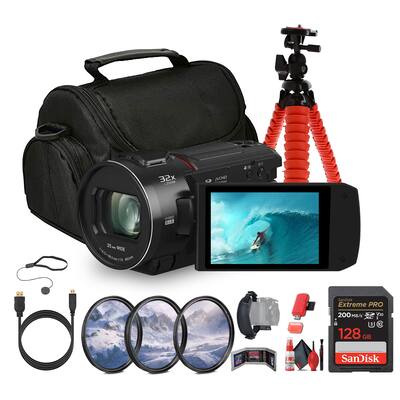
Comparing Popular Memory Card Types
To make things clearer, here’s how the most common camcorder memory card types compare:
| Type | Max Capacity | Max Speed | Typical Use |
|---|---|---|---|
| SDHC | 32GB | Up to 104 MB/s | HD video, budget camcorders |
| SDXC | 2TB | Up to 312 MB/s | 4K video, high-end camcorders |
| CFast | 512GB | Up to 600 MB/s | Pro 4K/6K camcorders |
| XQD | 2TB | Up to 440 MB/s | Pro video, high speed |
| microSD | 1TB | Up to 160 MB/s | Action cams, compact devices |
Best Memory Cards For Different Camcorder Needs
Every camcorder user has different needs. Here’s how to match the right card to your use:
For Beginners And Family Video
Most entry-level camcorders use SDHC or SDXC cards. For simple HD video, a 32GB or 64GB Class 10/U1 card is enough. It’s affordable and reliable for family moments, travel, or school projects.
For Vloggers And Content Creators
If you record in 4K, or do frequent edits and uploads, choose at least a 64GB SDXC U3/V30 card. SanDisk Extreme Pro and Lexar Professional are top picks for this group. These cards give fast transfer speeds and handle large video files easily.
For Professional Videographers
Pros shooting weddings, documentaries, or commercial work need high capacity and speed. Go for 128GB/256GB SDXC U3/V60 cards or higher. For RAW or slow-motion footage, CFast or XQD cards offer the speeds required for advanced camcorders.
For Action Cameras
Many action cams (like GoPro) use microSDXC U3/V30 cards. Choose cards built for temperature, shock, and water resistance. Samsung EVO Select and SanDisk Extreme are popular choices.
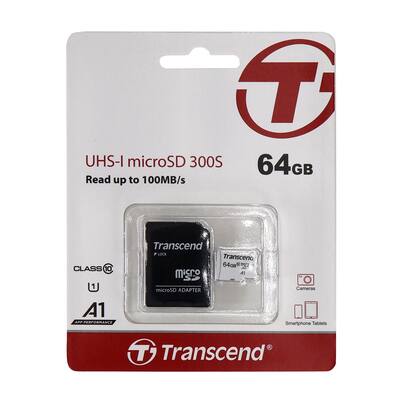
How Speed Classes Affect Recording Quality
The speed rating of your memory card can make or break your footage. Here’s why:
- Low speed cards may stop recording mid-shot, especially in 4K or high frame rates.
- Cards with higher speed classes enable smooth, uninterrupted video.
- Camcorders with dual card slots may allow “relay recording” (when one card fills up, the next takes over), but only if both cards are fast enough.
Below, see how speed class affects recording capability:
| Speed Class | Minimum Write Speed | Supported Video Quality |
|---|---|---|
| Class 4 | 4 MB/s | SD video only |
| Class 10/U1 | 10 MB/s | HD (1080p) |
| U3/V30 | 30 MB/s | 4K video |
| V60 | 60 MB/s | 4K/6K, high bitrate |
| V90 | 90 MB/s | 8K, RAW video |
Common Mistakes To Avoid
Even experienced videographers make these mistakes:
- Choosing the wrong speed class: Using a slow card for 4K video leads to dropped frames or errors.
- Buying fake or unreliable brands: Counterfeit cards are common, especially online. Stick to trusted sellers and brands.
- Ignoring compatibility: Not all cards work in all camcorders, especially large SDXC cards in old models.
- Formatting in the computer: Always format cards in your camcorder for best performance and compatibility.
- Using one large card only: Using multiple smaller cards lowers the risk of losing all footage if one card fails.
Non-obvious insight: Some camcorders need UHS-II cards for best speed, but are still compatible with UHS-I cards (at lower speed). Check your manual to know if you really benefit from a more expensive UHS-II card.
Real-world Recommendations
Here are some of the best memory cards for different camcorder uses, based on reliability, speed, and user reviews:
- SanDisk Extreme Pro SDXC UHS-I V30: Up to 170 MB/s, great for 4K and HD video.
- Lexar Professional 2000x SDXC UHS-II V90: 300 MB/s, for high-end camcorders and 6K/8K.
- Samsung EVO Plus microSDXC UHS-I U3: Best for action cams, durable, up to 130 MB/s.
- Sony TOUGH-G Series SDXC UHS-II V90: Rugged design, up to 300 MB/s, for pro environments.
- ProGrade Digital SDXC UHS-II V60: Affordable, fast, popular among wedding videographers.
Another insight: The difference between UHS-I and UHS-II cards matters most when transferring files to your computer, not always during recording. If your camcorder is UHS-I only, a UHS-II card won’t make recording faster, but transfers may be quicker if your reader supports UHS-II.
How To Check Your Camcorder’s Requirements
Look for the following in your camcorder’s manual or on the manufacturer’s website:
- Supported card type (SDHC, SDXC, microSD, etc.)
- Maximum supported capacity (e.g., up to 128GB)
- Required speed class for video recording modes
- Recommended brands or models
If you can’t find this information, search your camcorder’s model number and “memory card compatibility” or check resources like the official Wikipedia SD card page.

Care And Maintenance Tips
A good memory card will last years if treated well. Here’s how to avoid problems:
- Eject safely: Don’t remove the card while recording or before stopping the camcorder.
- Format in camera: Always format the card in your camcorder, not on your computer.
- Store properly: Keep cards in a case, away from dust, moisture, magnets, and extreme temperatures.
- Replace after heavy use: If you record professionally, replace cards every few years even if they still work.
Quick Reference Table: What Card For Which Camcorder?
Below is a handy reference for popular camcorder types and the best memory card match:
| Camcorder Type | Best Card Type | Recommended Speed Class | Typical Capacity |
|---|---|---|---|
| Entry-level HD | SDHC/SDXC | Class 10/U1 | 16–64GB |
| 4K Consumer | SDXC | U3/V30 | 64–128GB |
| Pro 4K/6K | SDXC/CFast/XQD | V60/V90 | 128–256GB |
| Action Cam | microSDXC | U3/V30 | 32–128GB |
Frequently Asked Questions
What Is The Difference Between Sdhc And Sdxc Cards?
SDHC cards can store up to 32GB, while SDXC cards go from 64GB up to 2TB. SDXC cards are needed for high-resolution video and longer recordings. However, not all devices that support SDHC also support SDXC, so check your camcorder’s compatibility.
How Can I Tell If A Memory Card Is Fast Enough For 4k Video?
Look for speed class markings like U3, V30, or higher on the card. These mean the card can handle at least 30 MB/s write speed, which is the minimum for 4K recording in most camcorders. You can also check your camcorder’s manual for recommended speed classes.
Is It Safe To Use A Microsd Card With An Adapter In A Regular Camcorder?
Yes, most SD adapters for microSD cards work well. However, for long or important recordings, a full-size SDXC card is more reliable. Adapters can sometimes cause connection issues, so always test before important shoots.
How Do I Avoid Buying Fake Memory Cards?
Buy from reputable sellers and brands. Check packaging and the card itself for signs of tampering. If the price is much lower than usual, it may be a counterfeit. Many brands offer tools on their website to check serial numbers.
Can I Use A Card With A Higher Speed Class Than My Camcorder Needs?
Yes. Using a faster card than required will not hurt your camcorder; it may even help with faster file transfers to your computer. But your camcorder will only record at the speed it supports.
Choosing the best memory card for your camcorder isn’t just about size or price. The right card means smooth recording, no lost moments, and safe storage of your memories or professional work. Taking time to match your camcorder’s needs with the right speed, type, and brand gives you peace of mind and the best results, every time you hit record.

