
A small black device with a lens, a fold-out screen, and buttons—many people know this as a camcorder. But few truly understand how it works or why it became such a vital tool for capturing memories and making videos. In today’s world, where smartphones can record videos, you may wonder: what is a camcorder and how is it different from other cameras? Let’s take a deeper look at what makes a camcorder unique, how it works, and why it still matters for video creators.
What Is A Camcorder?
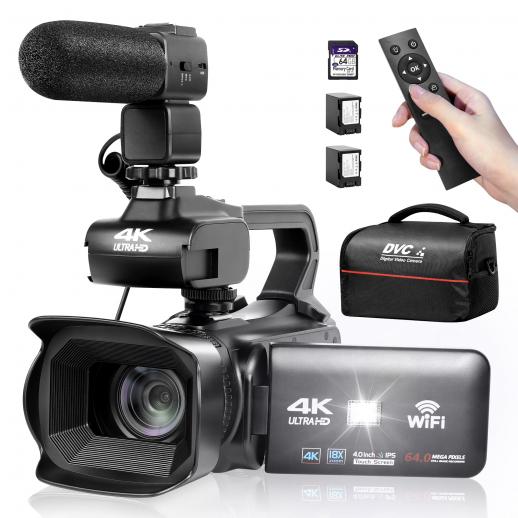
A camcorder is a portable electronic device designed mainly to record video and audio. The name comes from combining “camera” and “recorder.” Unlike still cameras that focus on photos, a camcorder is built for shooting moving images. Most camcorders also have a built-in microphone, a zoom lens, and a fold-out screen. This makes it easy to record, watch, and even edit video clips.
Camcorders first appeared in the 1980s. Back then, they used videotape. As technology improved, camcorders started using digital storage like SD cards, hard drives, or DVDs. Today, camcorders are smaller, lighter, and can record high-definition (HD) or even 4K video.
How Does A Camcorder Work?
At its core, a camcorder turns light and sound into digital video files. Here’s a simple breakdown of the process:
- Light enters through the camcorder’s lens.
- The lens focuses the light onto an image sensor (usually CMOS or CCD).
- The sensor turns the light into an electronic signal.
- The camcorder’s processor converts this signal into a video file.
- Audio is captured by a built-in or external microphone and synced with the video.
- The video file is saved to a memory card, hard drive, or other storage.
Let’s look closer at each part, so you understand how the whole system works.
The Lens
The lens is the “eye” of the camcorder. It controls how much light gets in and focuses it onto the image sensor. Most camcorders have a zoom lens, letting you record things far away or close up. Good lenses can capture clear images even in low light.
The Image Sensor
The image sensor is where the magic happens. It’s a chip that turns light into electrical signals. There are two main types:
- CCD (Charge Coupled Device)
- CMOS (Complementary Metal Oxide Semiconductor)
Most modern camcorders use CMOS sensors because they use less power and can process video faster.
The Processor
The processor in a camcorder is like its brain. It changes the signals from the sensor into a video file. It also handles things like color correction, noise reduction, and adding effects.
Audio Recording
A built-in microphone records sound along with the video. Higher-end camcorders let you connect external microphones for better audio quality. The camcorder syncs the audio with the video file, so everything matches when you play it back.
Storage
Early camcorders used videotapes, but today, most use SD cards, hard drives, or even internal memory. This makes it easy to move videos to a computer or share them online.
Types Of Camcorders
Camcorders come in many shapes and sizes. Here are the most common types:
| Type | Main Use | Key Feature |
|---|---|---|
| Consumer Camcorders | Family videos, travel | Easy to use |
| Professional Camcorders | TV, film, events | High image quality, manual controls |
| Action Camcorders | Sports, outdoor adventures | Small, tough, waterproof |
| 360° Camcorders | Virtual reality, immersive video | Records in all directions |
Consumer Camcorders
These are meant for everyday users. They are simple, lightweight, and often have automatic settings. Great for vacations or family events.
Professional Camcorders
Used by TV stations, filmmakers, and event videographers. They offer more control over focus, color, and audio. They also support advanced accessories.
Action Camcorders
Think of brands like GoPro. These are small, strong, and can go underwater or survive a fall. Perfect for sports or travel where bigger cameras would break.
360° Camcorders
These record everything around them. You can watch the video and move the view in any direction, making you feel like you’re inside the action.
Key Features Of A Camcorder
Not all camcorders are the same. Here are important features that set them apart:
- Zoom Range: Optical zoom is more important than digital zoom. Optical zoom keeps the picture sharp when you get closer.
- Image Stabilization: Reduces shakiness in your video, especially when holding the camera by hand.
- Recording Resolution: Most modern camcorders can record in Full HD (1080p) or even 4K. Higher resolution means clearer video.
- Low Light Performance: Some camcorders work better in dim rooms or at night.
- Audio Inputs: External mic jacks give better sound options.
- Battery Life: Longer battery life means you can record for hours without recharging.
- Storage Options: SD cards are common, but some models have built-in memory or support larger cards.
- Touch Screen Controls: Makes changing settings and playback easier.
- Wi-Fi/Bluetooth: Lets you share videos or control the camcorder from your phone.

Camcorders Vs. Other Video Devices
You might ask: why use a camcorder when smartphones and cameras can also record video? Here’s a quick comparison:
| Device | Video Quality | Audio Quality | Battery Life | Ergonomics |
|---|---|---|---|---|
| Camcorder | High (up to 4K/8K) | High (external mic support) | Long (2–6 hours) | Easy to hold for long time |
| Smartphone | Medium/High | Medium | Short (1–2 hours) | Not designed for long recording |
| DSLR/Mirrorless Camera | Very High | Medium/High (needs accessories) | Medium (30–90 mins) | Bulky, not always comfortable |
Where Camcorders Win
- Long recording times: No overheating or time limits like many cameras.
- Better sound: Audio jacks and built-in mics are optimized for video.
- Comfort: Designed to hold for hours without getting tired.
Where Smartphones/cameras Win
- Convenience: You always have your phone.
- Multi-use: One device for photos, video, apps, and calls.
- Low cost: No need to buy a second device.
How To Use A Camcorder: Step-by-step
If you’re new to camcorders, here’s a simple guide to recording your first video:
- Charge the battery fully.
- Insert a memory card (check your camcorder’s manual for supported types).
- Turn on the camcorder and open the LCD screen.
- Set the shooting mode (auto mode is best for beginners).
- Frame your shot using the screen. Use the zoom lever if needed.
- Press the record button to start filming. Keep the camera steady.
- Press stop when you’re done.
- Review your video on the screen.
- Transfer files to a computer using a USB cable or card reader.
Pro Tips For Beginners
- Always check battery and memory before shooting.
- Use both hands to keep the camcorder steady.
- Try not to zoom in and out too much while recording.
- Record a few seconds before and after the main action to make editing easier.
Common Mistakes When Using Camcorders
Even experienced users can make mistakes. Here are some to avoid:
- Ignoring audio: Bad sound can ruin a good video. Test your mic, especially outdoors.
- Fast panning: Moving the camcorder too quickly makes video hard to watch.
- Not cleaning the lens: Fingerprints or dust can blur your footage.
- Using digital zoom: This lowers quality. Stick to optical zoom.
- Forgetting the light: Record in well-lit places for best results.
Why Choose A Camcorder In 2024?
You might think camcorders are old-fashioned. But for many people, they’re still the best tool for serious video work. Here’s why:
- Unlimited recording: Great for lectures, interviews, or long events.
- Reliable: Less risk of overheating or running out of space.
- Special features: Slow motion, time-lapse, and manual controls that are not always on phones.
- Comfort: Designed for stable, long sessions.
- Professional look: Videos often look smoother and sound clearer than phone footage.
Many YouTubers, teachers, and event videographers rely on camcorders for these reasons.

The Evolution Of Camcorders
Camcorders have changed a lot over the years. Early models were big, heavy, and expensive. Tapes held only 30–60 minutes of video. Today, even affordable camcorders can record hours of HD video on a single SD card. Some can even stream live to YouTube or Facebook.
For example, the Sony FDR-AX53 is a popular 4K camcorder for under $1000. It has image stabilization, a good zoom, and supports external microphones. On the other hand, professionals might use a Canon XF405, which costs more but offers broadcast-quality video and advanced features.
According to Wikipedia, camcorders are still widely used in education, journalism, and film.
Non-obvious Insights Beginners Miss
Many beginners believe all video cameras are the same. But here are two details that often surprise new users:
- Audio matters more than video. Viewers will forgive a slightly blurry picture, but not bad sound. Investing in an external mic makes a big difference.
- Long-form recording is unique. Many DSLRs and smartphones shut off after 20–30 minutes to prevent overheating. Camcorders can record entire events without stopping, which is essential for live performances or lectures.
Frequently Asked Questions
What Is The Main Difference Between A Camcorder And A Regular Camera?
A camcorder is designed mainly for recording video and sound together for long periods. Regular cameras (like point-and-shoot or DSLR) are made for still photos, and their video features are often limited in length and control.
Can I Use A Camcorder For Live Streaming?
Yes, many modern camcorders offer HDMI or USB outputs for live streaming. Some models even have built-in Wi-Fi for direct streaming to YouTube or other platforms. Always check your camcorder’s specs to see if it supports this feature.
Do Camcorders Still Use Tapes?
Most new camcorders use digital storage like SD cards or built-in memory. Tape-based camcorders are now rare and only found in older or second-hand models.
Is A Camcorder Better Than A Smartphone For Video?
For long videos, events, or projects where audio quality matters, a camcorder is usually better. Smartphones are more convenient for quick clips, but they lack features like optical zoom, audio input, and long battery life.
What Should I Look For When Buying A Camcorder?
Key things to consider are image quality (HD or 4K), optical zoom, audio options (external mic support), battery life, and storage. Also, think about what you’ll use it for—family events, YouTube, or professional projects.
A camcorder remains a powerful tool for anyone serious about making high-quality video. Whether you’re capturing memories or creating content, understanding how camcorders work helps you make the best choice for your needs.

