
Stepping into the world of video recording today, you will hear a lot about 4K camcorders. This technology isn’t just for professional filmmakers; even travel vloggers, teachers, and parents are asking about 4K. But what exactly is a 4K camcorder, and is it something you really need? If you’re thinking about upgrading your video gear, it’s important to understand what 4K offers, what makes it different from HD, and whether it matches your needs. Let’s dive deep into this topic and help you make a confident decision.
What Is A 4k Camcorder?
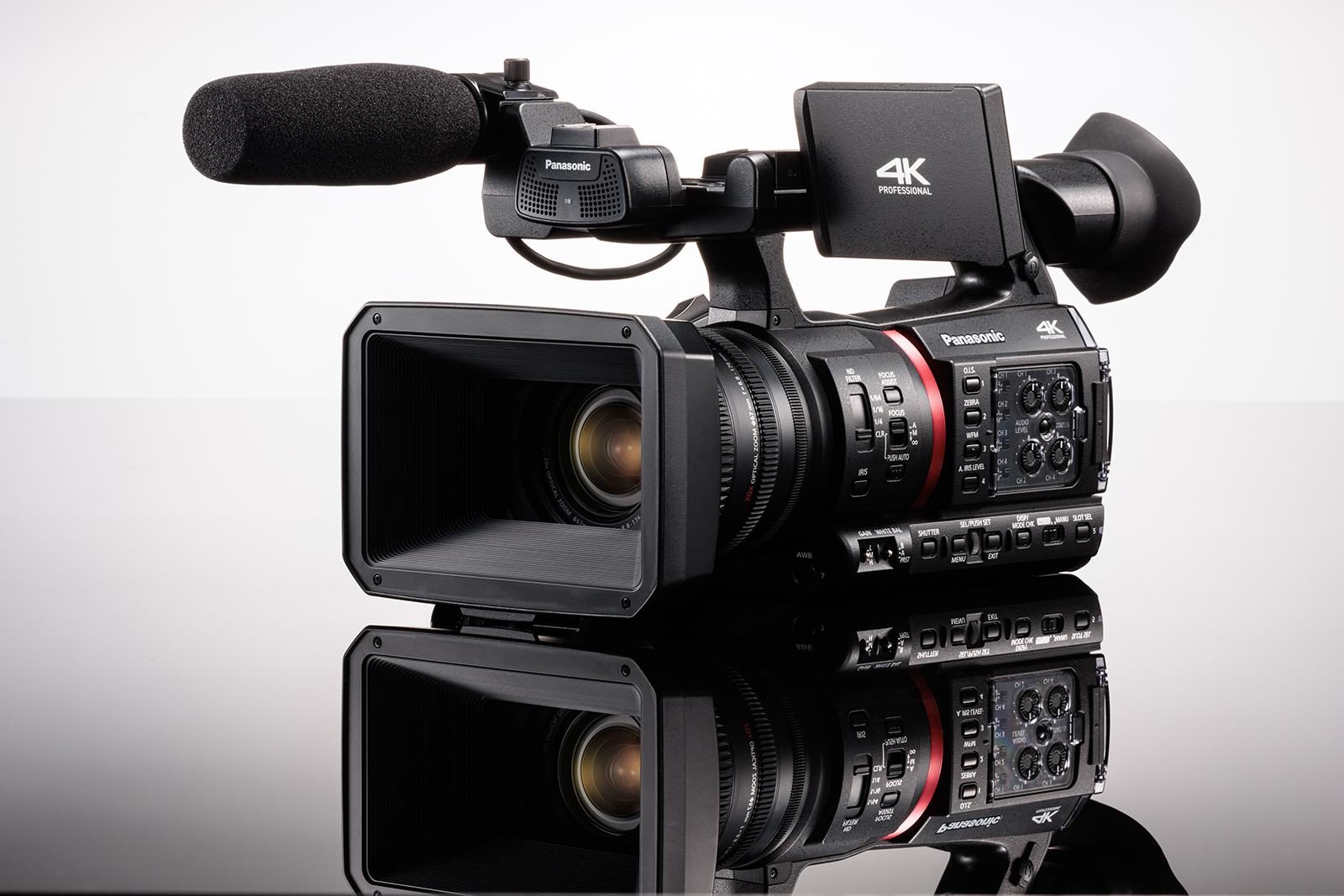
A 4K camcorder is a video camera that records in a resolution of about 3840 x 2160 pixels. This is called 4K because the image is nearly 4,000 pixels wide. Compared to Full HD (1920 x 1080 pixels), 4K footage has four times as many pixels, giving you sharper and clearer video. Most modern 4K camcorders store footage on SD cards and offer features like image stabilization, autofocus, and zoom.
Many camcorders today are small enough to hold in one hand, but they pack impressive technology inside. Some offer extra controls for audio, manual focus, and color, making them attractive not just for hobbyists, but also for semi-professionals.
Key Features Of 4k Camcorders
- High resolution: 4K (3840 x 2160 pixels)
- Better detail: Captures sharper images, even when zoomed or cropped
- Modern codecs: Efficient video compression for smaller file sizes
- Connectivity: HDMI, USB, Wi-Fi, and sometimes live streaming
- Manual controls: Options for exposure, focus, and audio
How 4k Differs From Hd And Other Formats
Resolution is the number of pixels in your video. The more pixels, the clearer and more detailed the image. Here’s a simple comparison:
| Format | Resolution (pixels) | Common Use |
|---|---|---|
| HD (720p) | 1280 x 720 | Older YouTube, basic streaming |
| Full HD (1080p) | 1920 x 1080 | Standard TV, YouTube |
| 4K (2160p) | 3840 x 2160 | Modern TV, professional video |
4K isn’t just about more pixels. It often comes with better color, improved light handling (HDR), and smoother frame rates. Many 4K camcorders also record in higher bit rates, which means less compression and better image quality.
Why Would You Need A 4k Camcorder?
Not everyone needs 4K, but there are clear reasons to consider it.
1. Future-proofing Your Videos
Televisions, monitors, and even smartphones are now 4K-ready. If you record in 4K today, your videos will still look great years from now. Shooting in HD may look outdated sooner than you expect.
2. Editing Advantages
When you shoot in 4K, you have extra pixels to work with. This lets you:
- Crop your video without losing detail
- Stabilize shaky footage using software
- Zoom in on important parts of your scene
For example, if you film a wide shot of a group, you can later zoom in on one person in editing—and it still looks sharp.
3. Professional And Business Use
If you create content for clients, YouTube, or social media, 4K helps you stand out. Clients expect sharp, clean footage. Many platforms, including YouTube and Netflix, now support 4K streaming.
4. Better Detail For Special Moments
Capturing family events, sports, or travel? 4K preserves small details that HD might miss. Faces, textures, and backgrounds all look richer.
5. Improved Color And Dynamic Range
Many new 4K camcorders record using advanced color profiles (like HDR or log gamma). This gives you more control when editing and a more natural look.
When You Might Not Need A 4k Camcorder
While 4K is impressive, sometimes it’s not the best choice.
1. Storage And File Size
4K video files are large—often 4–5 times bigger than HD. You need fast, high-capacity SD cards and a computer with plenty of storage.
2. Editing Power
Editing 4K video requires a strong computer. Older laptops may struggle, making editing slow or even impossible.
3. Sharing And Viewing
If your audience watches mostly on smartphones or old TVs, they may not notice the 4K difference. Uploading 4K videos also takes longer and uses more internet data.
4. Budget
4K camcorders cost more than HD models. If you’re on a tight budget, a high-quality HD camcorder may be a smarter buy.
Comparing 4k Camcorders With Other Video Options
To help you see the main differences, here’s a quick comparison of 4K camcorders, HD camcorders, and smartphones:
| Device | Video Quality | Zoom | Audio Control | Best For |
|---|---|---|---|---|
| 4K Camcorder | Excellent (4K) | Optical zoom | Manual/External mic | Serious creators, events |
| HD Camcorder | Good (1080p) | Optical zoom | Some manual | Casual users, home video |
| Smartphone | Varies (up to 4K) | Digital zoom only | Basic | Quick clips, social media |
Smartphones are convenient, but a 4K camcorder gives you more creative control and better results, especially in low light or when you need zoom.
Key Features To Look For In A 4k Camcorder
If you decide to buy a 4K camcorder, here are the most important features to consider:
1. Sensor Size
A bigger sensor captures more light, improving low-light performance and giving you a softer background (bokeh). Most consumer camcorders use 1/2.3-inch or 1-inch sensors. For the best quality, choose the largest sensor your budget allows.
2. Lens Quality And Zoom
Look for a sharp lens with optical zoom. Optical zoom keeps image quality high, while digital zoom can make video look pixelated.
3. Image Stabilization
This helps reduce shaking, especially when shooting handheld. Some models combine optical and digital stabilization for smoother footage.
4. Audio Inputs
If you want great sound, pick a model with a microphone input. Built-in mics are OK for casual use, but an external mic sounds much better.
5. Manual Controls
Manual options for focus, exposure, and white balance let you adapt to different shooting conditions.
6. Slow Motion And High Frame Rates
Some 4K camcorders record at 60 frames per second (fps) or even higher in HD. This is useful for sports, action, or creative effects.
7. Connectivity
Features like Wi-Fi, live streaming, and easy USB/HDMI connections make it simple to share your videos or use the camcorder as a webcam.

Popular Uses For 4k Camcorders
4K camcorders are used by a wide range of people:
- Content creators: YouTubers, vloggers, and online teachers use 4K for sharp, professional-looking videos.
- Event videographers: Weddings, concerts, and sports look fantastic in 4K.
- Travel enthusiasts: 4K brings landscapes and city scenes to life.
- Education and training: Detailed video helps in online courses and tutorials.
- Family memories: Capture birthdays, graduations, and holidays in the best quality.
Hidden Benefits And Little-known Facts
Many first-time buyers miss a few important points:
- Downscaling Improves Quality: Even if you plan to share in HD, shooting in 4K and then resizing to HD (downscaling) often produces a sharper, cleaner video. This is because you start with more detail and less noise.
- Still Photos From Video: 4K footage lets you grab high-quality still images from your video. Each frame is about 8 megapixels, good enough for small prints or social media.
- Better Green Screen Effects: If you plan to use green screen, 4K makes it easier to cut out backgrounds cleanly, thanks to the extra detail.

Common Mistakes When Buying A 4k Camcorder
Many buyers make errors that lead to disappointment or wasted money. Here’s what to watch out for:
- Ignoring the Computer Factor: If your computer is old or slow, editing 4K video will be frustrating. Make sure your system can handle 4K files.
- Not Considering Accessories: You may need extra batteries, SD cards, a tripod, or an external microphone. Budget for these extras.
- Underestimating File Size: 4K files fill up storage quickly. Plan for backup solutions like external hard drives or cloud storage.
- Buying Based on Specs Alone: Real-world reviews, user experience, and sample footage are just as important as technical specs.
How To Choose The Right 4k Camcorder For You
Choosing the best model depends on your needs and budget. Here are a few practical steps:
- Set your budget. Good 4K camcorders start around $400, but advanced models can cost $1,500 or more.
- List your must-have features. For example, do you need a microphone input or a flip-out screen?
- Check reviews and sample videos. Look for user-uploaded footage on YouTube to see real results.
- Think about future use. Will you grow into more advanced features, or is a simple model enough?
- Test in person if possible. Handling the camcorder can reveal small details you might miss online.
Top Alternatives To 4k Camcorders
While 4K camcorders offer many advantages, you might consider:
- Mirrorless cameras: Great video, interchangeable lenses, but larger and more complex.
- Action cameras: Small, rugged, and 4K capable, but limited zoom and controls.
- DSLRs: Good for photo and video, but heavier.
- Smartphones: Ultra-portable, but limited manual control and zoom.
Each has strengths and trade-offs. For most people who want easy, high-quality video, a 4K camcorder is the best balance of performance and convenience.
Is A 4k Camcorder Worth It For You?
Ask yourself:
- Do you want the best possible image quality for future-proof videos?
- Will you edit your footage and benefit from cropping, zooming, or stabilizing?
- Do you film events, travel, or content where detail matters?
- Can your computer handle 4K editing, and do you have enough storage?
If you answer “yes” to most of these, a 4K camcorder is a smart investment. If not, a high-quality HD camcorder or even your smartphone might be enough.
For more technical details, you can read about 4K video recording on the Wikipedia page for 4K resolution.
Frequently Asked Questions
What Does “4k” Actually Mean?
4K refers to a video resolution of about 3840 x 2160 pixels, which is roughly four times the pixel count of Full HD (1080p). This gives a much sharper and more detailed image.
Can I Watch 4k Videos On A Regular Tv?
You can watch 4K videos on a normal HD TV, but you won’t see the extra detail. To enjoy the full quality, you need a 4K TV or monitor.
Are 4k Camcorders Good In Low Light?
Many 4K camcorders handle low light well, especially those with larger sensors. However, sensor size and lens quality matter more than just the resolution.
Is 4k Worth It For Youtube?
Yes, uploading in 4K can help your videos stand out, and YouTube supports 4K playback. Even viewers with HD screens will often see sharper video because of YouTube’s compression.
How Much Storage Do I Need For 4k Video?
4K video files are large. For example, one hour of 4K footage at 60 Mbps can use around 27 GB. It’s smart to have several large SD cards and external drives for backup.
Upgrading to a 4K camcorder can be a game-changer if you value high-quality video, flexibility in editing, and future-proof results. Take some time to match your needs and budget, and you’ll capture memories and content that look great for years to come.

