
A camcorder is a fantastic tool for capturing memories, making vlogs, or recording special events. But nothing is more frustrating than your camcorder shutting down in the middle of a moment because the battery is dead. Many people wonder, “How long does the battery last in a camcorder?
” The answer is not as simple as a single number. Battery life depends on several factors, from battery type to camera settings and even how you use your device. If you want to record without worry, understanding these factors can help you plan better and avoid disappointment.
Let’s break down everything you need to know about camcorder battery life, what influences it, how to make it last longer, and what to expect from different models on the market today.
What Determines Camcorder Battery Life?
Many beginners think all camcorder batteries last the same amount of time, but that’s not true. Several things affect battery life:
1. Battery Type And Capacity
Most consumer camcorders use lithium-ion batteries. These are popular because they are light, rechargeable, and hold energy well. The milliampere-hour (mAh) rating shows a battery’s capacity. For example, a 2000mAh battery can deliver 2000 milliamperes for one hour. Higher mAh usually means longer usage. However, higher capacity often means a larger, heavier battery.
2. Recording Quality
Filming in 4K uses more power than HD. High-resolution recording needs more processing, which drains the battery faster. Similarly, recording at higher frame rates (like 60fps instead of 30fps) will use more energy.
3. Features And Settings
Turning on features like image stabilization, Wi-Fi, GPS, or LCD screen backlight increases power use. Some camcorders let you turn off these features to save battery.
4. Age And Condition Of The Battery
Batteries lose their ability to hold a charge as they age. If your battery is more than two years old, it might last only half as long as when it was new.
5. Temperature
Using a camcorder in extreme cold or heat can reduce battery life. Cold weather especially makes batteries run out faster.
6. Usage Habits
Frequent zooming, reviewing footage on the LCD, or leaving the camcorder in standby mode all eat up battery power.
Typical Battery Life: Numbers You Can Expect
On average, most standard camcorder batteries last between 1 to 3 hours of continuous recording per charge. But this is just a starting point. Here are some typical numbers:
- Entry-level camcorders: 60–90 minutes
- Mid-range camcorders: 90–150 minutes
- Professional camcorders: 120–180 minutes (with larger batteries)
Below is a comparison of battery life for popular camcorder models:
| Camcorder Model | Battery Model | Capacity (mAh) | Recording Time (HD) |
|---|---|---|---|
| Sony HDR-CX405 | NP-BX1 | 1240 | ~115 min |
| Canon Vixia HF R800 | BP-727 | 2685 | ~180 min |
| Panasonic HC-V770 | VW-VBT190 | 1940 | ~130 min |
| JVC Everio GZ-RY980 | Internal | 4450 | ~300 min |
These numbers are from manufacturers, but real-life results may be 10–20% less, especially if you use power-hungry features.
Battery Types: How They Affect Your Shooting
Understanding battery types helps you choose the right one for your needs.
Removable Vs. Built-in Batteries
- Removable batteries are common in consumer and pro camcorders. You can buy spares and swap them easily.
- Built-in batteries are found in some compact and action camcorders. When the battery dies, you must recharge before filming again.
Aftermarket Batteries
Many third-party companies sell batteries that fit popular camcorders. Some offer higher capacity at a lower price, but reliability and safety can vary. Always check reviews and buy from trusted brands.
How To Make Your Camcorder Battery Last Longer
Even if your battery is average, you can stretch the recording time with smart habits:
1. Lower Lcd Brightness
The LCD uses a lot of power. Turn brightness down or use the viewfinder if possible.
2. Turn Off Extra Features
Disable Wi-Fi, Bluetooth, GPS, and image stabilization unless you need them.
3. Use Power-saving Modes
Many camcorders have an “eco mode” that dims the screen or shuts down non-essential functions.
4. Limit Playback And Reviewing
Watching footage on the camcorder screen drains the battery. Review only when necessary.
5. Keep Batteries Warm
If filming in cold weather, keep spare batteries in your pocket to keep them warm.
6. Carry Spare Batteries
Having an extra battery or two is the simplest way to keep shooting.
7. Charge Batteries Fully
Partial charges give less recording time. Always start with a full charge.
8. Update Firmware
Manufacturers sometimes release firmware updates that improve battery efficiency.
9. Clean Battery Contacts
Dirty contacts can reduce performance. Wipe with a dry cloth if needed.
10. Avoid Cheap Chargers
Using low-quality chargers can damage batteries and make them lose charge faster.
Real-world Examples: How Long Do Different Users Get?
Battery life varies a lot depending on how you use your camcorder. Here are a few scenarios:
- Travel Vlogger: Films short clips, turns off Wi-Fi, reviews footage often. Battery lasts about 90 minutes.
- Wedding Videographer: Shoots long ceremonies with spare batteries. Each battery gives about 2 hours of continuous HD video.
- Family User: Records kids’ events in short bursts, often lets the camcorder sleep between shots. Battery can last all day with breaks.
Comparing Camcorder Battery Life To Other Devices
People often compare camcorders to smartphones or action cameras. Here is a quick look:
| Device Type | Average Battery Life | Notes |
|---|---|---|
| Camcorder (HD/4K) | 1–3 hours | Designed for long recording |
| DSLR/Mirrorless (Video) | 40–90 min | Shorter due to higher power draw |
| Action Camera | 60–90 min | Small battery, compact design |
| Smartphone (Video) | 1–2 hours | Not optimized for long video |
Camcorders generally give more recording time per battery compared to cameras or phones, but less than some large professional equipment.
Common Mistakes That Drain Battery Fast
Many new camcorder users make simple mistakes that waste battery power:
- Leaving the camcorder on in standby while not recording
- Using maximum screen brightness
- Keeping Wi-Fi/Bluetooth on all the time
- Forgetting to charge batteries fully
- Not carrying a spare battery
Avoid these, and you’ll get more out of every charge.
Choosing The Right Battery For Your Needs
If you need longer recording time, look for these features:
- High-capacity battery options (check for official extended batteries)
- Camcorders with removable batteries (so you can swap easily)
- Models with USB charging, so you can use power banks
Some brands offer “extended life” batteries. For example, Canon’s BP-745 gives almost double the time of the BP-727. Always check compatibility before buying.
How To Check Your Camcorder’s Battery Life
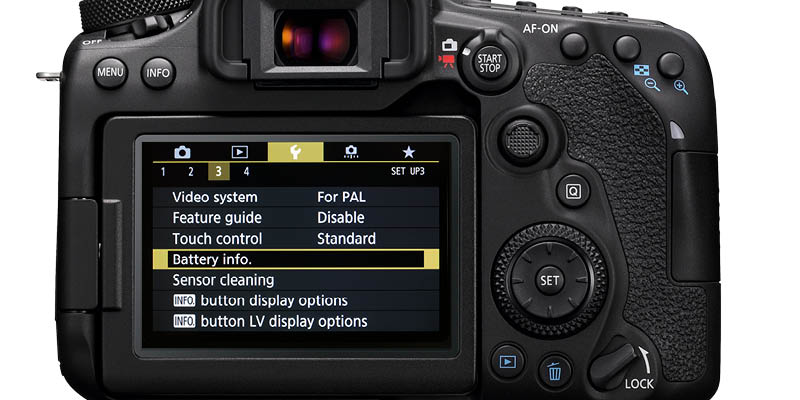
Most camcorders show battery status on the screen, but not all are accurate. If you want to know your real battery life:
- Charge fully and start recording a test video in your usual settings.
- Time how long it runs before shutting off.
- Repeat with different settings (HD vs. 4K, with or without features).
- Write down your results for reference.
This gives you a true idea of what to expect in your shooting style.
The Impact Of 4k And Advanced Features
Shooting in 4K or using heavy features like slow motion or image stabilization can cut battery life by 20–40%. For example, a battery that lasts 2 hours in HD might last only 1 hour in 4K. If you often use advanced settings, plan to bring extra batteries.
Charging On The Go
For longer shoots, consider these charging options:
- Portable power banks (if your camcorder supports USB charging)
- Car chargers for events on the road
- AC adapters if shooting indoors for long periods
Some camcorders let you record while plugged in, but not all. Always check your manual.
When To Replace Your Battery
A battery that once lasted 2 hours but now lasts only 30–40 minutes is near the end of its life. Lithium-ion batteries usually last 300–500 charge cycles. After that, replacement is best for reliable performance.
Are Expensive Batteries Worth It?
Original batteries from the camera brand are often more expensive than third-party ones. However, they usually offer:
- More accurate battery status readings
- Better compatibility and safety
- Longer lifespan
Cheap batteries can work, but there’s a risk of swelling, overheating, or not delivering the advertised capacity. If filming important events, original batteries are a safer choice.
How Professionals Manage Battery Life
Professional videographers often:
- Carry 4–8 batteries to every shoot
- Use external battery packs for long events
- Have a charging station on site
- Rotate batteries to avoid overuse of a single one
This may sound like overkill, but it prevents missed moments during important events.
Non-obvious Insights About Camcorder Battery Life
- Menu navigation and focusing drain more power than you think. Spending a lot of time adjusting settings or focusing uses the screen and internal motors, which can eat up battery quickly—even before you start recording.
- Temperature swings can permanently reduce battery health. If you often take your camcorder from hot cars to cold outdoors, battery performance may drop over time. Store batteries at room temperature when possible.
Frequently Asked Questions
How Do I Know If My Camcorder Battery Is Failing?
If your battery charges quickly but drains much faster than before, or if your camcorder shuts off even when the battery icon looks half full, it’s a sign the battery is worn out. Swelling or difficulty fitting the battery also means it’s time for a replacement.
Can I Use My Camcorder While Charging?
Some camcorders allow shooting while plugged in, but not all. Check your manual. Even if supported, charging may be slower during recording, and you may need a specific AC adapter.
Are Third-party Batteries Safe To Use?
Some third-party batteries work well and offer good value, but always buy from known brands. Poor-quality batteries can damage your camcorder or fail suddenly. Read reviews and look for safety certifications.
How Long Does It Take To Fully Charge A Camcorder Battery?
Charging times vary by battery size and charger speed. Most camcorder batteries take 1.5 to 3 hours to charge fully. Fast chargers may reduce this time, but frequent fast charging can shorten battery lifespan.
Where Can I Find Official Battery Life Information For My Camcorder Model?
You can find official specs on the manufacturer’s website or in the user manual. For detailed comparisons, sites like B&H Photo Video provide useful data on battery options for different camcorders.
No matter what camcorder you use, understanding battery life helps you prepare, avoid missed shots, and make the most of every charge. By choosing the right battery, using smart habits, and planning ahead, you can capture every important moment without worrying about power.

