
Professional videography is more than just pointing a camera and pressing record. Behind every stunning wedding highlight, documentary, or corporate video, there is a skilled videographer making intentional choices. Camcorders are one of their main tools, but how do professionals actually use them to achieve such high-quality results?
If you’re starting out or just curious, let’s break down the secrets of how the pros make the most of modern camcorders.
Why Camcorders Remain Essential For Professionals
Some might think that smartphones and DSLRs have made camcorders old-fashioned. But for professional videographers, camcorders still play a vital role. Why? Camcorders are built for video from the ground up. They offer longer recording times, better ergonomics, and advanced features that make shooting easier and more reliable. For example, many camcorders can record for hours without overheating, something DSLRs often struggle with. This makes them perfect for events, interviews, and documentaries.
How Professionals Set Up Camcorders For Maximum Quality
Before filming, professionals spend time setting up their camcorders. This is a key step that beginners often rush or ignore.
Choosing The Right Settings
- Resolution and Frame Rate: Most pros shoot in 4K or at least 1080p for crisp images. The frame rate depends on the project. For cinematic looks, 24fps is common. For sports or smooth motion, 60fps is popular.
- Bitrate: Higher bitrate means better image quality but larger files. Professionals balance quality with storage needs.
- White Balance: Setting this manually prevents color shifts and ensures accurate skin tones.
Customizing Picture Profiles
Professional camcorders let users choose or customize picture profiles—pre-set looks for color and contrast. Many videographers use flat or log profiles. These keep more detail in shadows and highlights, making color grading in editing easier and more flexible.
Using Manual Controls
Auto settings are tempting, but pros rely on manual control for focus, exposure, and audio. This gives them full creative control and prevents sudden changes that can ruin footage.
The Art Of Camera Movement
Static shots can look boring. Professionals use camcorders in ways that add life and story to their videos.
Handheld Vs. Stabilized Shooting
Handheld shots offer energy and realism but can appear shaky if not controlled. Many pros use shoulder mounts, gimbals, or tripods for smooth movement. Knowing when to use which method is a key skill.
Panning, Tilting, And Zooming
Smooth pans (side-to-side), tilts (up and down), and zooms help direct the viewer’s attention. Camcorders often have servo zoom controls for steady, slow zooms—something tricky to do on most DSLRs or smartphones.
Tracking Shots
Following a subject smoothly is challenging. Many professionals use camcorders with image stabilization and practice steady walking or use special equipment like sliders and dollies.
Audio Recording: Capturing Sound Like A Pro
Great video means nothing without great sound. Camcorders are often preferred because they have better audio inputs and controls.
Using External Microphones
Built-in microphones rarely give professional results. Most camcorders have XLR inputs for connecting high-quality external microphones, such as:
- Lavalier mics for interviews and speeches
- Shotgun mics for focused sound in documentaries or films
- Handheld mics for news and events
Monitoring And Adjusting Audio
Professionals wear headphones while filming to catch any unwanted noise or technical issues. They adjust audio levels manually, avoiding peaking (distortion) or audio that is too quiet. Some camcorders offer real-time audio meters for precise adjustments.
Lighting Techniques With Camcorders
Light affects everything the camera sees. Professionals know how to use both natural and artificial lighting to get the best shot.
Working With Available Light
If filming outdoors or in a location with limited gear, pros adjust their camcorders’ settings—like ISO, aperture, and shutter speed—to get the right exposure. They may use reflectors to bounce sunlight or choose the best time of day for softer light.
Adding Artificial Lighting
In studios or controlled environments, videographers use LED panels, softboxes, or spotlights. Camcorders with zebra patterns help them spot overexposed areas so they can adjust the lights or camera settings.
Managing Data And Workflow
Shooting is only one part of the job. Professionals need a smooth system for handling all the footage they capture.
Choosing Reliable Media
Most camcorders use SD cards, CFast cards, or internal memory. Professionals pick high-speed, high-capacity cards to avoid dropped frames or lost footage. It’s common to carry several cards and label them by project or shoot day.
Backing Up Footage
Losing footage is a disaster. Pros back up files immediately after shooting, often to two separate drives. Some camcorders even support dual recording—saving the same video to two cards at once for extra safety.
Organizing Clips
Good file management saves hours in editing. Professionals create clear folder structures and rename files logically, making it easy to find the right clip later.
Comparing Camcorders To Other Video Tools
To understand why camcorders are still popular among professionals, it helps to see how they compare to other video devices.
| Feature | Camcorders | DSLR/Mirrorless | Smartphones |
|---|---|---|---|
| Recording Time | Hours (no limit) | Typically 30 min | Depends on storage |
| Audio Inputs | XLR, 3.5mm, Pro controls | Usually 3.5mm only | Limited, needs adapters |
| Ergonomics | Designed for video | Photo-first, video second | Handheld, not ergonomic for long use |
| Autofocus | Continuous, smooth | May be slower or noisier | Good, but limited manual control |
| Price Range | $800–$10,000+ | $600–$6,000+ | $300–$2,000 |
This shows why, for serious projects, camcorders often win.
Professional Camcorder Features That Make A Difference
Not all camcorders are equal. Professionals look for certain features that set high-end models apart.
Key Features
- Large sensors for better low-light performance and shallow depth of field
- ND filters built-in, letting videographers control exposure even in bright conditions without changing aperture or shutter speed
- Dual card slots for backup recording
- Timecode support for syncing multiple cameras
- Wireless control via apps for remote shooting
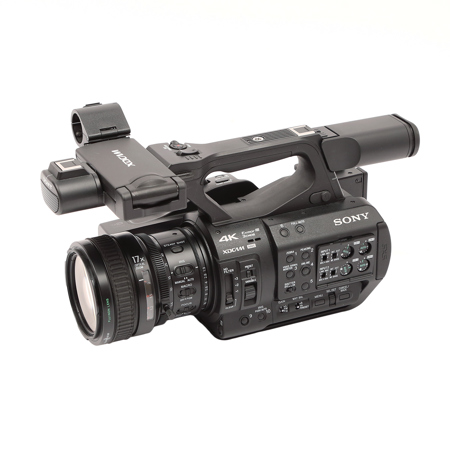
Example: Sony Pxw-z280
The Sony PXW-Z280 is a favorite among news and documentary shooters. It offers 4K recording, three manual lens rings for focus, zoom, and iris, and built-in ND filters. It’s rugged and reliable, even in difficult environments.
Shooting Different Types Of Videos
Professional videographers use camcorders for many types of projects. Each type has its own demands.
Weddings And Events
Events move fast and can’t be repeated. Camcorders’ long battery life, reliable autofocus, and fast zoom controls help capture every important moment, from the vows to the dance floor.
Documentaries
Documentaries often mean long days and unpredictable conditions. Camcorders handle hours of recording and quick changes in lighting or sound. Features like XLR inputs and built-in ND filters are essential.
Corporate And Training Videos
Clients expect clean, clear video and audio. Camcorders’ professional audio controls and easy-to-use focus make them ideal for interviews, presentations, and training materials.
Sports And Action
For sports, frame rates of 60fps or higher are common. Camcorders with good stabilization and fast zoom can follow fast-moving subjects smoothly.
Non-obvious Professional Techniques
Beyond the basics, experienced videographers use tricks that beginners often miss:
- Pre-visualization: Before shooting, professionals mentally plan or storyboard shots. This saves time and avoids mistakes on set.
- Custom Scene Files: Camcorders let users save custom settings for different locations or lighting. Switching between them speeds up shooting.
- Peaking and Zebra Tools: Peaking highlights in-focus areas; zebra patterns show overexposed spots. Using these, pros get sharp, well-exposed footage even in tough conditions.
- Timecode Sync: When using multiple cameras, professionals sync timecodes so editing is faster and more accurate.
Editing And Color Grading
The work isn’t done when filming stops. Professionals use editing software to cut, arrange, and enhance their footage. Shooting with a log profile gives more flexibility for color grading, letting them match shots and create a consistent, polished look.
Common Mistakes And How To Avoid Them
Even experienced shooters can slip up. Here are mistakes and how professionals handle them:
- Relying on auto modes: Manual settings give better, more consistent results.
- Ignoring audio: Always monitor with headphones and adjust levels as you go.
- Forgetting backups: Copy footage to at least two locations right after the shoot.
- Not labeling files or cards: Use clear naming to avoid confusion later.
Maximizing Camcorder Accessories
Accessories can make or break a shoot. Professionals invest in:
- Spare batteries and chargers for long days
- High-speed SD cards to handle 4K or high frame rates
- Tripods, monopods, and gimbals for different shot styles
- External monitors for better focusing and framing
A well-packed gear bag means less stress and more creative freedom.
Cost Vs. Value: Is A Professional Camcorder Worth It?
While high-end camcorders cost more than entry-level gear, the value comes from reliability, speed, and professional features. For anyone making a living from video, these advantages pay off quickly. For example, a wedding videographer who misses the first kiss because their camera overheated might lose both the client and future referrals.

Advanced Camcorder Technologies
Modern camcorders include advanced features that help professionals stay ahead:
| Technology | Benefit |
|---|---|
| Face/Eye Detection Autofocus | Keeps subjects sharp even if they move |
| Wireless Streaming | Live broadcast to the web directly |
| 4K/6K/8K Recording | Future-proof footage, better cropping options |
| HDR Recording | Wider color and brightness range for modern displays |
| Built-in LUT Preview | See the final color look while shooting |
Professional Development And Community
Many videographers keep learning through workshops, online courses, and professional groups. They share tips, review new camcorders, and help each other solve technical problems. Staying connected helps professionals keep up with new techniques and industry standards. For more about the history and evolution of video technology, check out this Wikipedia article on camcorders.
Frequently Asked Questions
What Are The Main Advantages Of Professional Camcorders Over Other Cameras?
Professional camcorders offer long recording times, advanced audio controls, and better ergonomics for video. These features are essential for events, documentaries, or any project where reliability and quality matter.
How Important Is Manual Control For Video Quality?
Manual control is critical. It allows videographers to adjust focus, exposure, and audio for each scene, resulting in more consistent and professional footage than auto modes.
Can Professional Camcorders Record In 4k Or Higher?
Yes, many modern camcorders support 4K, 6K, or even 8K recording. Higher resolution means sharper images and more flexibility in editing.
Do Professionals Use Built-in Microphones?
Rarely. Most professionals use external microphones (like shotgun or lavalier mics) connected through the camcorder’s XLR or 3.5mm inputs for much better sound quality.
How Do Videographers Avoid Losing Footage?
Professionals use multiple memory cards, immediate backups, and sometimes dual recording features to keep footage safe. Clear file organization and labeling are also important.
The world of professional videography is always evolving, but camcorders remain a core tool for those who demand quality and reliability. Understanding how professionals use them is the first step to creating your own standout videos.

